1. What is it Link to heading
- Build a simple Python MCP server using FastMCP and pan-os-python librairies
- Configure Claude Desktop to communicate with a local MCP server
- We will ask Claude to validate if an address object exist on the Palo Alto firewall, if not it need to create it
Claude is Anthropic LLM, and Claude Desktop is its client on Windows/Mac
https://www.claude.com/download
FastMCP is a Python library that helps build MCP server quickly with minimal code
https://github.com/jlowin/fastmcp
pan-os-python is a Python SDK that helps to interact with Palo Alto firewall
https://github.com/PaloAltoNetworks/pan-os-python
What is MCP? Link to heading
Model Context Protocol allow you to connect LLMs to resources they can use.
- Resources source of information the LLM can read
- Tools allow the LLM to perform actions
- Prompts how the LLM interact with resources/tools
2. Why do this Link to heading
The goal of this lab is to take a first step toward understanding MCP servers and how they can interact with Palo Alto Firewalls. In this initial phase, my objective is to get it working as simply as possible. Meaning that it will not be optimized nor secure, it will not follow best practice, but it will work.
Future posts in this series will build on this foundation as I explore more advanced concepts and share what I learn.
3. Diagram Link to heading
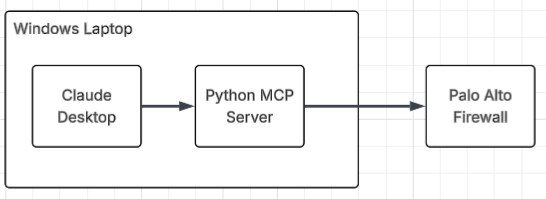
4. Lab Link to heading
4.1 Python MCP server Link to heading
git clone https://github.com/jpitc-ca/palo-mcp.git
git clone the project, this lab will be in folder 001-addr-obj
Some dependencies need to be install with pip in order to run it, there are a couple of options to install them.
If you want to keep your python package clean you could use python virtual environment.
Python with Virtual Environment Link to heading
cd 001-addr-obj
py -m venv venv
Set-ExecutionPolicy -ExecutionPolicy RemoteSigned -Scope CurrentUser #Optional depends on ps execution policies
.\venv\Scripts\activate.ps1 # get you inside the venv
pip install -r requirements.txt
pip list
example:
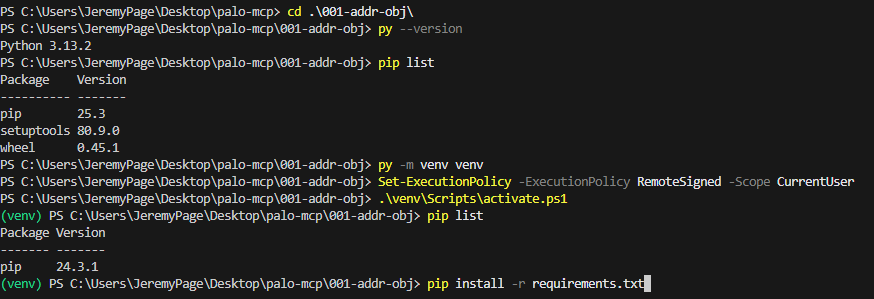
Now all python libraries will be installed in the virtual environment.
Python without Virtual Environment Link to heading
cd 001-addr-obj
pip install -r requirements.txt
pip list
Testing dependencies Link to heading
Just to make sure you have all the right dependencies, run the script
if the script fail with ModuleNotFoundError then you have a problem with the libraries
If it just hang and does nothing, its OK, its waiting to receive some input to do something.
not normal:
PS C:\Users\JeremyPage\Desktop\palo-mcp\001-addr-obj> py .\palo-mcp-addr-obj.py
Traceback (most recent call last):
  File "C:\Users\JeremyPage\Desktop\palo-mcp\001-addr-obj\palo-mcp-addr-obj.py", line 1, in <module>
    from mcp.server.fastmcp import FastMCP
ModuleNotFoundError: No module named 'mcp'
normal:
(venv) PS C:\Users\JeremyPage\Desktop\palo-mcp\001-addr-obj> py .\palo-mcp-addr-obj.py
4.1.1 FastMCP Link to heading
Import the library and create an object from the FastMCP class
from mcp.server.fastmcp import FastMCP

server = FastMCP("Palo Alto Firewall Manager")
now we want to create MCP tools that LLM can use.
this is done using Python decorator and functions:
@server.tool()
async def create_address_object()
The functions then reference type hint (what it expect as var type input/output).
It also as Docstring which tell the LLM what this function can do
Functions used:
- create_address_object()
- list_address_objects()
- delete_address_object()
- pdate_address_object()
4.1.2 pan-os-python Link to heading
https://pan-os-python.readthedocs.io/en/latest/reference.html
firewall module Link to heading
Import the library and create an object from the firewall module
from panos import firewall, objects

_firewall_instance = firewall.Firewall(FIREWALL_IP, api_key=API_KEY)
objects module Link to heading
        addr = objects.AddressObject(
            name=name,
            value=ip_address,
            description=description
        )

        fw.add(addr)
        addr.create()
Create an address object with the attributes provided
add()Add an object as a child of this objectcreate()Push object to the live device (nd)
In other functions I am also using those methods
refreshallPull all children from the live devicefind()Return object by name and typedelete()Delete from live device and config treeapply()Push object to the live device (d)
4.2 Claude Desktop Link to heading
Claude Anthropic free account is fine for this test using a local MCP server (Claude Desktop and MCP server on the same machine)
However, a paid account seems to be required when using remote MCP server
In order to configure Claude Desktop to interact with our python MCP server, we need to tell it where it reside
the configuration will vary if using or not python virtual environment
commandwhich Python exe to use to run the MCP server (If using venv add the path of python.exe inside the venv)argsthe path of the scriptenvenvironment variable to use, firewall IP and API key
With Python virtual environment Link to heading
{
  "mcpServers": {
    "palo-alto": {
      "command": "C:\\Users\\JeremyPage\\Desktop\\palo-mcp\\001-addr-obj\\venv\\Scripts\\python.exe",
      "args": ["C:\\Users\\JeremyPage\\Desktop\\palo-mcp\\001-addr-obj\\palo-mcp-addr-obj.py"],
      "env": {
        "FIREWALL_IP": "x.x.x.x",
        "FIREWALL_API_KEY": ""
      }
    }
  }
}
Without Python virtual environment Link to heading
{
  "mcpServers": {
    "palo-alto": {
      "command": "python",
      "args": ["C:\\Users\\JeremyPage\\Desktop\\palo-mcp\\001-addr-obj\\palo-mcp-addr-obj.py"],
      "env": {
        "FIREWALL_IP": "x.x.x.x",
        "FIREWALL_API_KEY": ""
      }
    }
  }
}
Now start Claude Desktop and check if there are any errors
error will be documented her: C:\Users\JeremyPage\AppData\Roaming\Claude\logs\mcp-server-palo.log
2025-11-19T16:31:25.411Z [palo-alto] [info] Server started and connected successfully { metadata: undefined }
2025-11-19T16:31:25.418Z [palo-alto] [info] Message from client: {"method":"initialize","params":{"protocolVersion":"2025-06-18","capabilities":{},"clientInfo":{"name":"claude-ai","version":"0.1.0"}},"jsonrpc":"2.0","id":0} { metadata: undefined }
C:\Users\JeremyPage\Desktop\palo-mcp\001-addr-obj\venv\Scripts\python.exe: can't open file 'C:\\Users\\JeremyPage\\Desktop\\palo-mcp\\001-addr-obj\\palo-mcp-addr-obj2.py': [Errno 2] No such file or directory
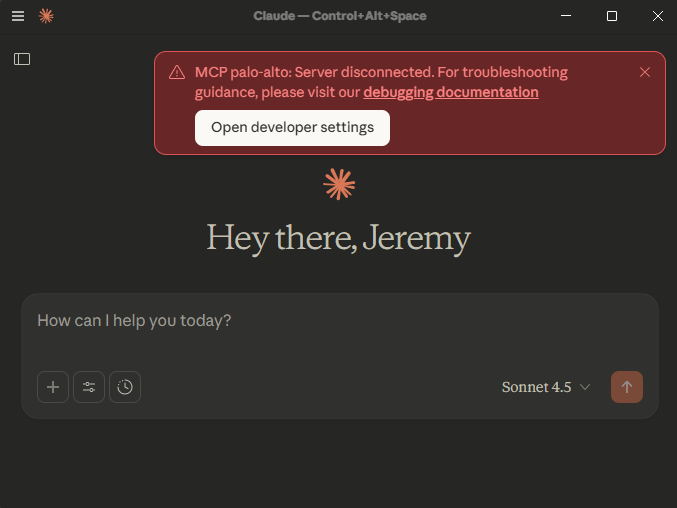
no error will look like this
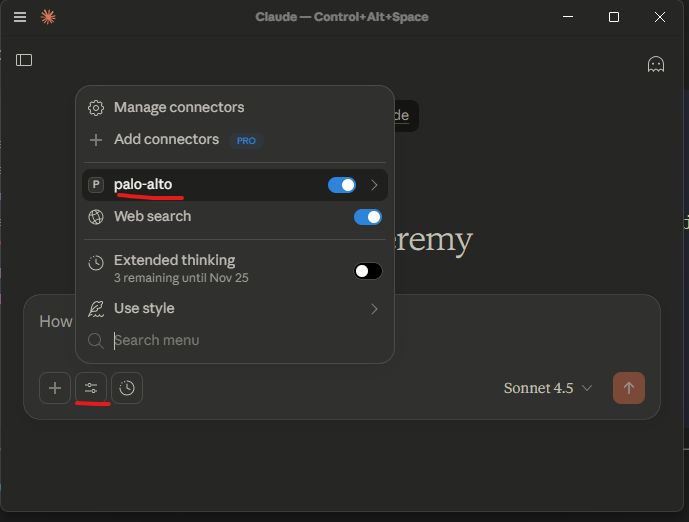
4.3 Testing Link to heading
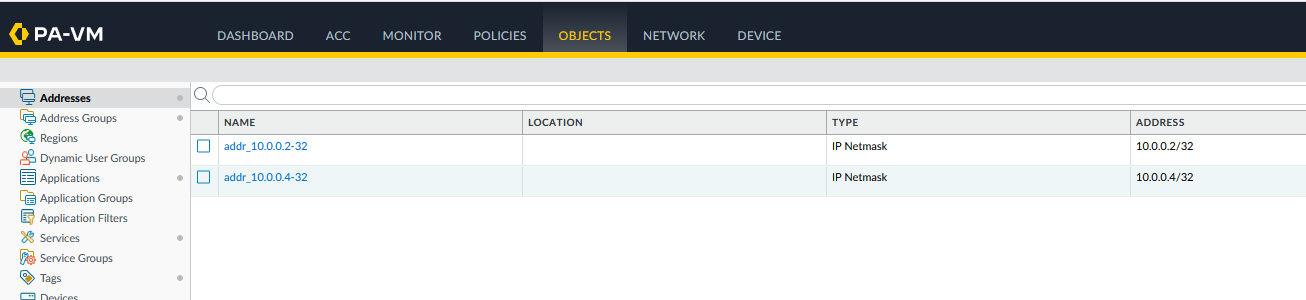
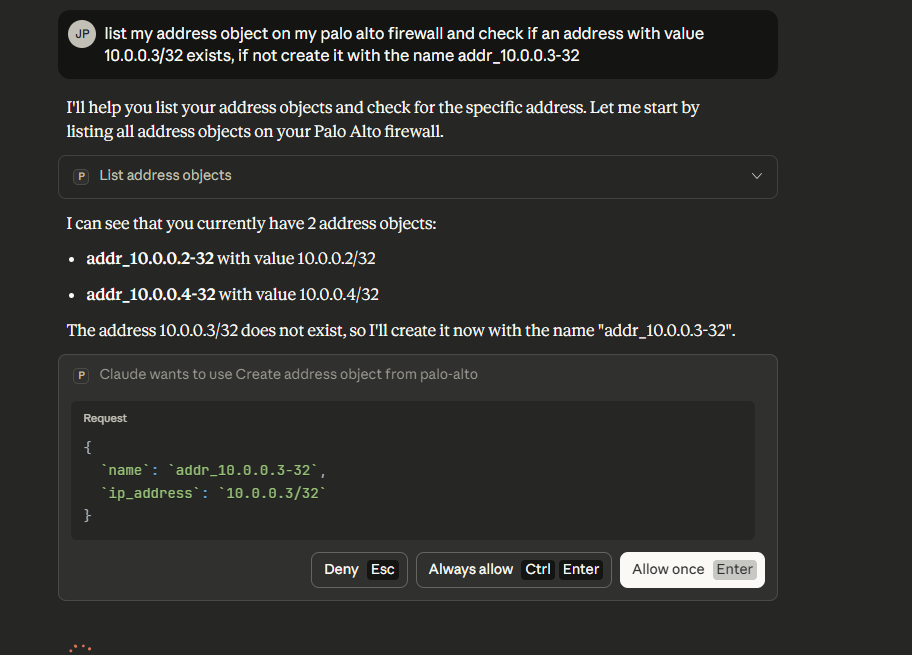
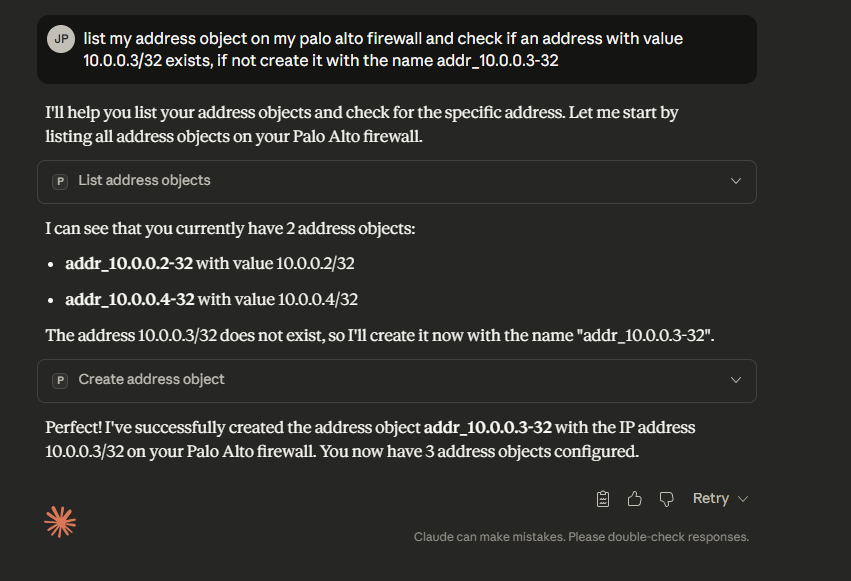
Now lets try this ! I will ask Claude to list my address object on my firewall, check if an address with value 10.0.0.3/32 exists and if not to create it
panos before:
claude prompt:
and the result
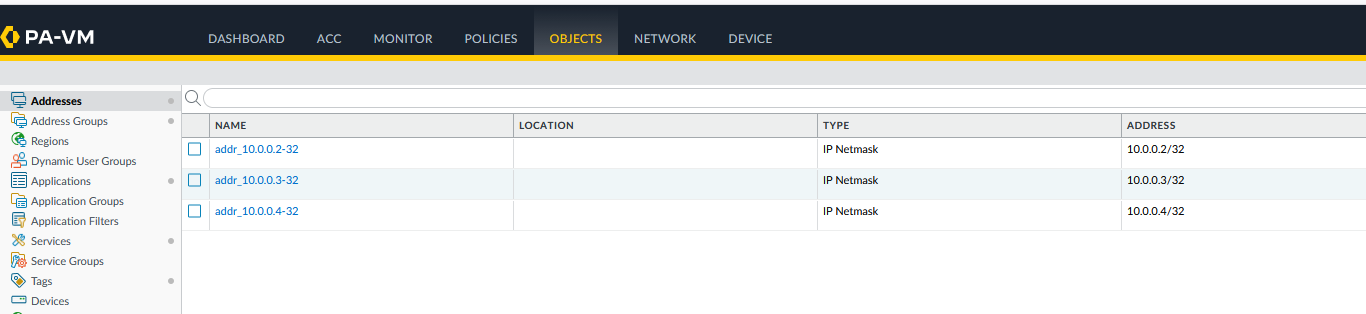
checking if the delete tool works too
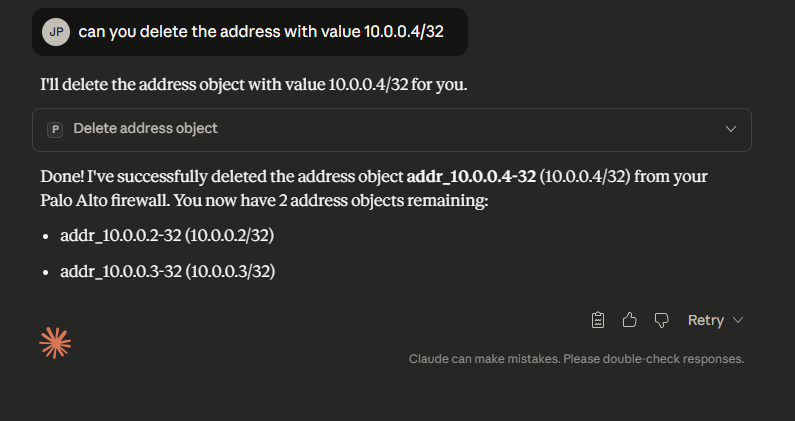
In this lab, we were able to list, create and delete address object on palo alto firewall using python local mcp server and Claude Desktop
5. Next Steps Link to heading
- Configure additional MCP tools to test potential real-world use cases a firewall engineer might encounter
- Configure the MCP server remotely on a docker host
- Panorama integration
- Other tool integration maybe Netbox
- how to secure and scale the mcp server better