Github: https://github.com/jpitc-ca/palo-mcp
Youtube:
1. What is it Link to heading
In this lab, I will be adding to the previous one where we set up an MCP server.
https://jpitc.ca/posts/palo/palo_mcp_setup/
This lab contains:
Restructuration of the Python program
- each MCP tools is a sub-module with its own .py files
- Logging is enable to get full visibility on the interaction between MCP and Palo
- singleton design pattern with only 1 Firewall instance
additional MCP tools available
- CRUD operations on security policies
- Operationnal command (CLI command) support
2. Why do this Link to heading
Addind MCP tools to the server give the prompt engineer the ability to do more actions on the firewall.
Modularization of the MCP server allow it to scale better, when adding/removing MCP tools
Logging make debugging easier and give better visibility
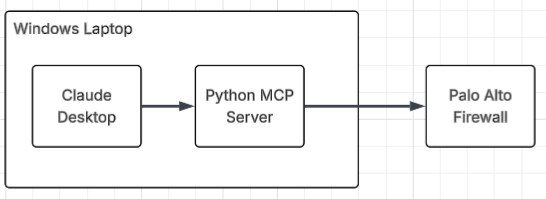
3. Diagram Link to heading
4. Lab Link to heading
4.1 Python MCP server Link to heading
git clone https://github.com/jpitc-ca/palo-mcp.git
git clone the project, this lab will be in folder 002-sec-policies
To understand how to set up the MCP server follow the previous lab
Script modules Link to heading
main.py
|
+---objects
|   |   create_address_object.py
|   |   delete_address_object.py
|   |   list_address_objects.py
|   |   update_address_object.py
|
+---op
|   |   operational_command.py
|
+---security_policies
|   |   create_security_policies.py
|   |   delete_security_policy.py
|   |   list_security_policies.py
|   |   update_security_policy.py
main.py is now dynamically importing all the MCP tools configured.
It also take care of logging to a file
Finally, it also create the Firewall object using pan-os-python, used by the sub-modules
Your claude_desktop_config.json will need to point to the main.py
{
  "mcpServers": {
    "palo-alto": {
      "command": "C:\\PATH-TO-FILE\\palo-mcp\\002-sec-policies\\venv\\Scripts\\python.exe",
      "args": ["C:\\PATH-TO-FILE\\palo-mcp\\002-sec-policies\\main.py"],
      "env": {
        "FIREWALL_IP": "",
        "FIREWALL_API_KEY": ""
      }
    }
  }
}
Logging Link to heading
Various Logs entries were configured to get better visibility on whats happening:
- MCP tools available
- CRUD operations made by the tools and operational commands
- errors
2025-11-21 15:26:37,684 [INFO] [palo_mcp] Loaded 9 MCP tool modules:
2025-11-21 15:26:37,685 [INFO] [palo_mcp]   ✓ tools.objects.create_address_object
2025-11-21 15:26:37,685 [INFO] [palo_mcp]   ✓ tools.objects.delete_address_object
2025-11-21 15:26:37,685 [INFO] [palo_mcp]   ✓ tools.objects.list_address_objects
2025-11-21 15:26:37,685 [INFO] [palo_mcp]   ✓ tools.objects.update_address_object
2025-11-21 15:26:37,685 [INFO] [palo_mcp]   ✓ tools.op.operational_command
2025-11-21 15:26:37,685 [INFO] [palo_mcp]   ✓ tools.security_policies.create_security_policies
2025-11-21 15:26:37,685 [INFO] [palo_mcp]   ✓ tools.security_policies.delete_security_policy
2025-11-21 15:26:37,685 [INFO] [palo_mcp]   ✓ tools.security_policies.list_security_policies
2025-11-21 15:26:37,685 [INFO] [palo_mcp]   ✓ tools.security_policies.update_security_policy
2025-11-21 15:28:36,859 [INFO] [palo_mcp] Connected to firewall at 192.168.0.96
2025-11-21 15:28:38,210 [INFO] [palo_mcp] Found 4 security policies
2025-11-21 15:29:37,160 [INFO] [palo_mcp] Created security policy: test_rule_google
2025-11-21 15:34:58,531 [INFO] [palo_mcp] Found 4 security policies
2025-11-21 15:35:45,687 [INFO] [palo_mcp] Updated security policy: test_rule_google
2025-11-21 15:37:14,131 [INFO] [palo_mcp] Deleted security policy: test_rule_google
2025-11-21 15:37:54,519 [INFO] [palo_mcp] Running operational command: show system info
Firewall Connection (Singleton Pattern) Link to heading
main.py
# Firewall Object
_firewall_instance: Optional[firewall.Firewall] = None

def get_firewall() -> firewall.Firewall:
    global _firewall_instance

    if _firewall_instance is None:
        try:
            _firewall_instance = firewall.Firewall(FIREWALL_IP, api_key=API_KEY)
            logger.info(f"Connected to firewall at {FIREWALL_IP}")
        except Exception as e:
            logger.error(f"Failed to connect to firewall: {str(e)}")
            raise Exception(f"Failed to connect to firewall: {str(e)}")

    return _firewall_instance
Implements a lazy singleton:
- Firewall is created only once.
- Subsequent calls re-use the same connection.
then its being imported in the .py for the mcp tool
from main import get_firewall, logger

fw = get_firewall()
4.2 Security Policies Link to heading
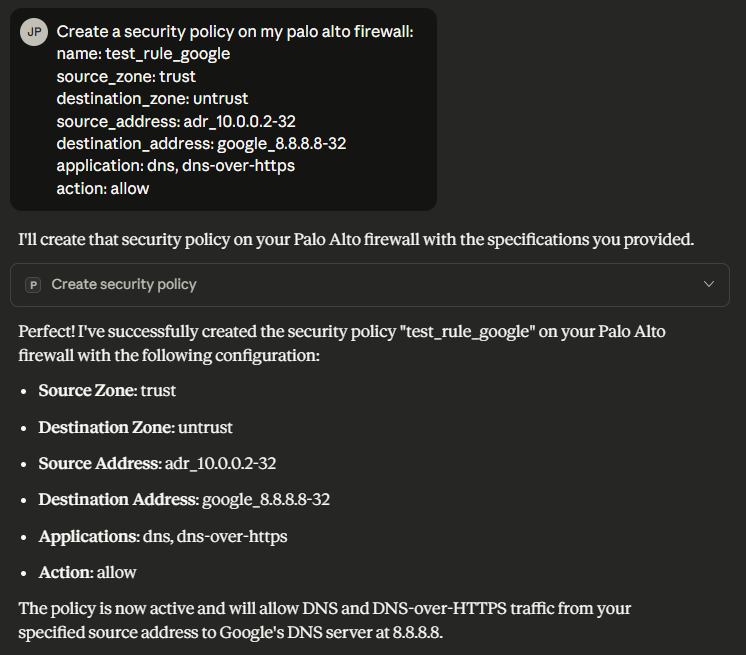
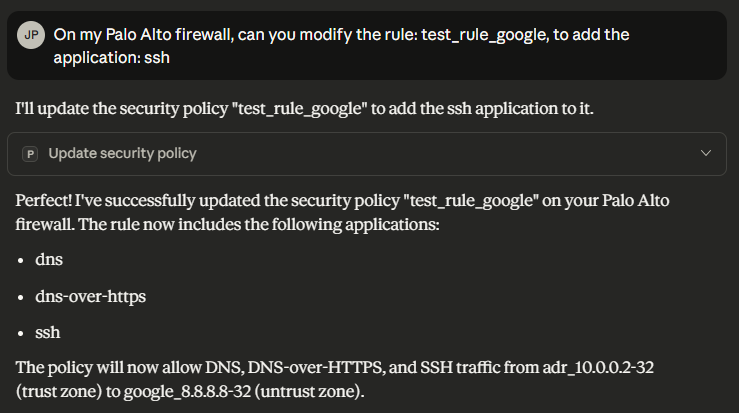
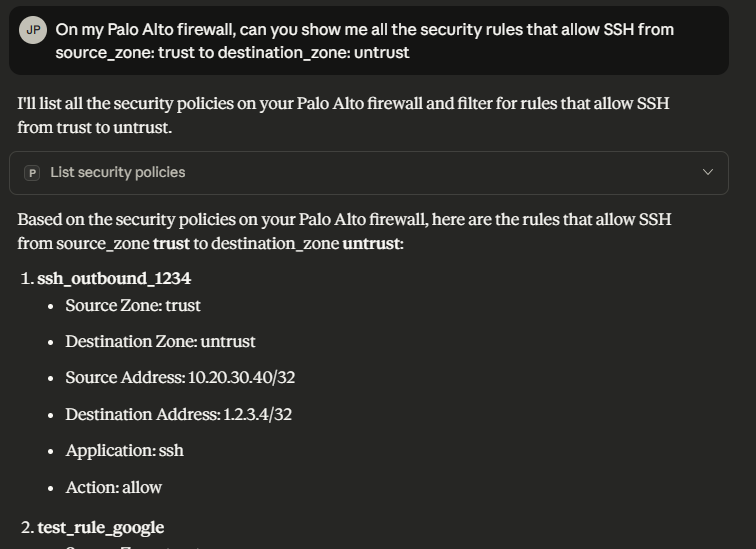
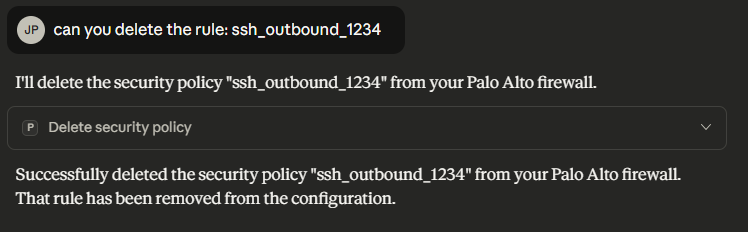
new MCP tools available, to do CRUD operations on security policies.
- tools.security_policies.create_security_policies
- tools.security_policies.delete_security_policy
- tools.security_policies.list_security_policies
- tools.security_policies.update_security_policy
create_security_policies Link to heading
update_security_policy Link to heading
list_security_policy Link to heading
delete_security_policy Link to heading
4.3 Operational Command Link to heading
https://pan-os-python.readthedocs.io/en/latest/getting-started.html#operational-commands
result = fw.op(
    command,
    xml=True
)
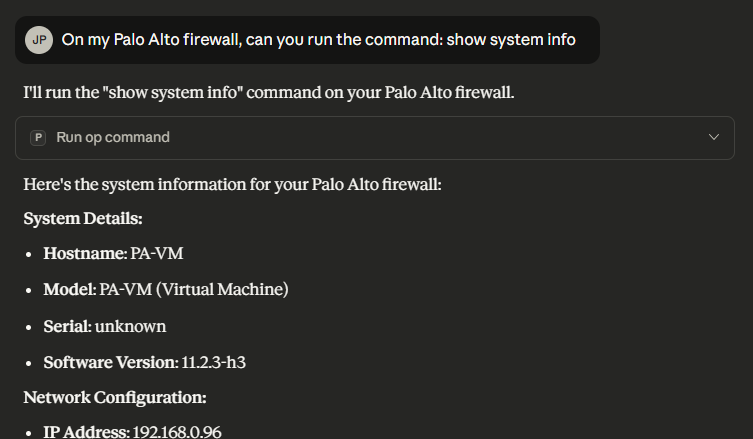
This allow to run any operational command from the LLM. These are command you would usually do from CLI.
4.4 Security Considerations Link to heading
With the addition of the operational command MCP tool, some of the commands could be disruptive (clear session all, request restart system, etc)
For this reason it could be wise to restrict what the LLM can do, this can be done on multiple level but a combination of all of those is probably the best approach.
LLM context restriction
in the docstring of the function, you can tell the LLM to only run it if the command start with the keyword show
        """
        Run a read-only operational CLI command on the Palo Alto firewall.

        IMPORTANT — SAFETY INSTRUCTION FOR THE LLM:
        ------------------------------------------------
        This tool MUST ONLY execute commands that begin with the word "show".
        If the provided command does not start with "show" (case-insensitive),
        the LLM MUST refuse to run it and return an error message instead.

        This restriction prevents the execution of configuration-changing,
        disruptive, or destructive operational commands.

        Args:
            command (str):
                A read-only Palo Alto operational command that begins with "show".
                Examples:
                    - "show system info"
                    - "show interface all"
                    - "show session info"
                    - "show routing route"

        Returns:
            str: Raw XML or text output from the firewall for the allowed "show" command.
        """
python code restriction
only run the fw.op(command) if it starts with the show keyword
if not command.lower().startswith("show"):
    logger.warning(f"Blocked non-show command: {command}")
    return (
        "✗ Error: Only 'show' commands are allowed for this operational tool. "
        "The provided command was blocked."
    )
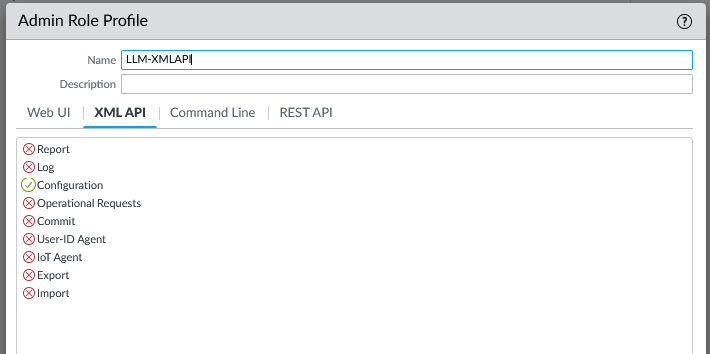
palo alto restriction
The API key is link to an admin account, the admin account have an admin role attach to it.
You could decide to completely restrict Operational Requests for specific users.
5. Next Steps Link to heading
- Configure the MCP server remotely on a docker host
- Panorama integration
- Other tool integration maybe Netbox
- how to secure and scale the mcp server better